Free

LODESTONE

The right file, before you finish typing.

Instant file search for Windows, 100% local. Alt + Space, three letters, and the right file shows up among millions, across all your drives. Open it, look at it without opening it, or drag it straight into After Effects or Resolve.

Free, No card needed

System
Windows 11, 64-bit
Version
1.1.0 · 26 Nov 2026
Full specifications ↓ Version 1.1.0 · what’s new ↓

Search the way you think

It searches as you type, through the name and folder of every file, on all your drives.

Even with a typo, even as a sentence

“lantrens aep” finds your Lanterns projects: when the exact search finds almost nothing, LODESTONE tries again allowing a typo, and tells you. You can also type a sentence: “videos over 2 GB modified this month”. What it understood shows up under the bar.

One shortcut per file type

Ctrl + 1 to 9: all, videos, images, audio, projects, documents, code, archives, folders. To go further, the operators power users know: ext:, path:, size:, dm:, !, |, quotes and even regex:.

See everything without opening anything

The preview panel shows the selected file: scrub a video with the mouse (ProRes, DNxHR, MXF, 10-bit H.265), view an EXR or a DPX, see a sound’s waveform, a text file in colour, what fills a folder. Then drag the file into After Effects, Resolve or Explorer.

Find what’s inside

Two options, off by default: you pick the folders, and everything stays on your PC.

A line from a script, a word in a PDF

Ctrl + 0: LODESTONE reads your text files, notes, subtitles, Word, PowerPoint, Excel and PDF files, and shows you the passage your words are in. With the OCR option, it even reads text in screenshots and scanned PDFs.

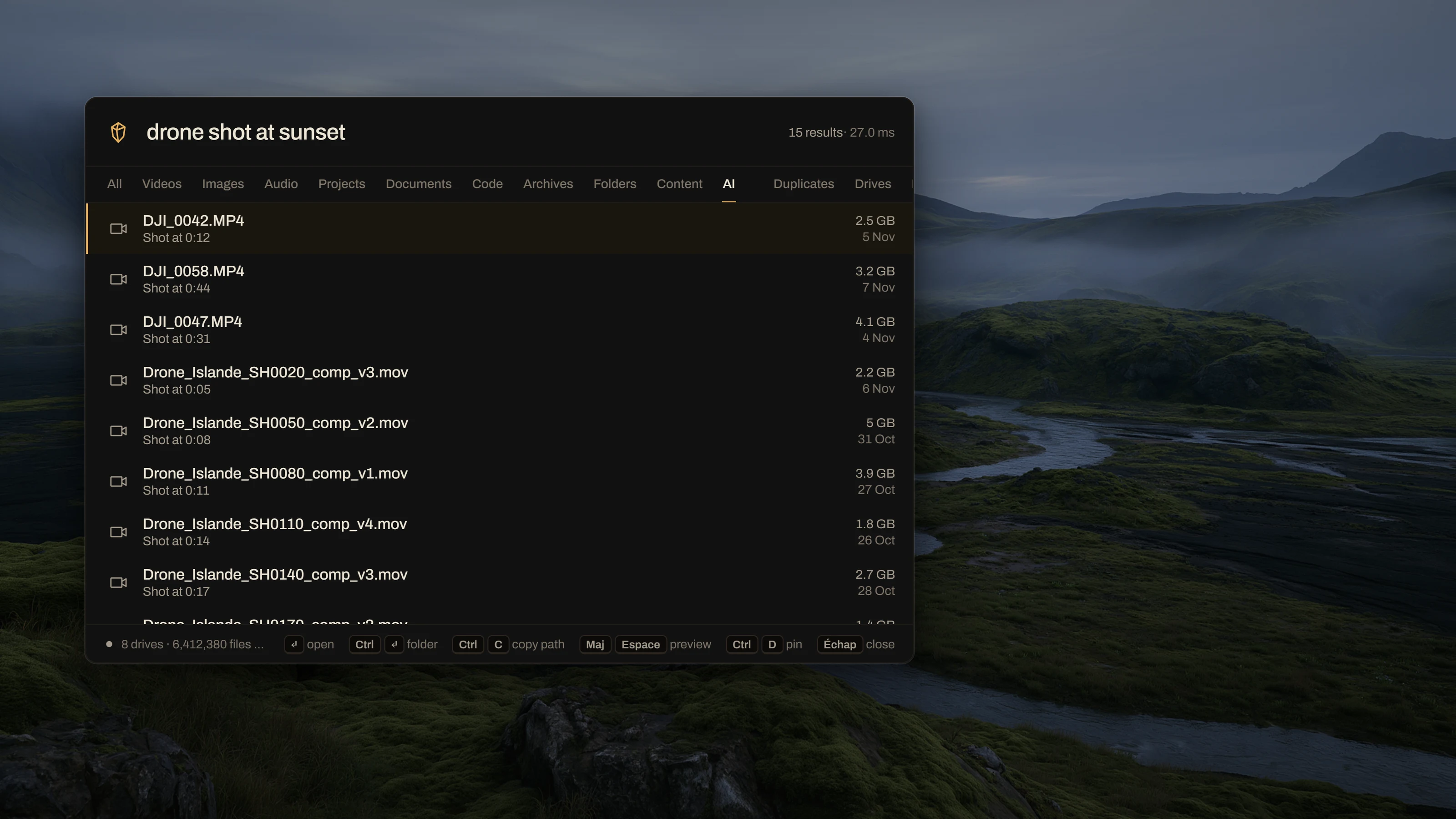
“A drone shot at sunset”

Ctrl + I: describe what you’re looking for, and the local AI looks through your images and videos to find the right shot, with the moment it’s at. It runs on your graphics card, offline, and pauses on its own when After Effects, Resolve or a game needs the card.

100% local.

100% local.

No account, no cloud, no ads. The index lives on your PC and follows every file created, renamed or deleted in real time. An unplugged drive stays searchable, greyed out as “offline”.

Free up space

Two more tools, worked out from the index: nothing to rescan.

Duplicates, 100% sure

Ctrl + Shift + D: LODESTONE compares the size, then the start, middle and end, then the whole content of each file. Only true duplicates are marked “identical”. A copy goes to the Recycle Bin, never anywhere else, and only after a second click.

What’s filling your drive?

Ctrl + Shift + E: the space taken by each drive and each folder, biggest first, and the biggest files. Worked out in a few milliseconds from the index, without reading the drive again.

Specs

System
Windows 11, 64-bit
Shortcut
Alt + Space (Alt + Shift + Space if it’s already taken), customizable
Drives
NTFS read directly (fastest), exFAT, FAT32 and ReFS by scanning; unplugged drives kept offline
Speed
6.4 million files indexed in 6.9 s, 339 MB of memory, 16 ms from a keystroke to an updated list (Ryzen 9 9950X3D)
Search
Typos, plain French and English sentences, quick filters, ext:, path:, size:, dm:, regex: operators…
Previews
Images, RAW, PSD, EXR, DPX; scrubbable videos (ProRes, DNxHR, MXF, H.264, H.265); audio, PDF, text and code, folders
Content (optional)
Text, notes, subtitles, Word, PowerPoint, Excel, OpenDocument, PDF, RTF; OCR for screenshots and scanned PDFs
Local AI (optional)
NVIDIA card, 16 GB of video memory recommended; about 20 GB to download once, from inside LODESTONE
Languages
English, French
Price
Free, for your email address
Version
1.1.0

FAQ

Is it really free?

Yes, with no licence and no limits. Leave your email address: the download link is sent there.

Do my files go online?

No. The index, previews, content search and AI all run on your PC. The only connection is downloading the AI models, once, if you install them.

Do I need a big graphics card?

Not for searching: search, previews and duplicates work on any PC. Only the optional AI needs an NVIDIA card (16 GB of video memory recommended).

Why does it ask for permission when installing?

To install its indexing service, just once. That service reads your drives directly, which is what makes LODESTONE so fast, and it only answers to your Windows account.

What about Mac?

Not for now: LODESTONE is made for Windows.

A word from Eric

LODESTONE is one of my first tools. I build everything myself, from the engine to this website, and I keep improving it from your feedback.

A question, an issue or an idea for a feature? Write to me: I answer every email myself, and that’s how the tools get better.

Email me

Eric, ARTEFACT LAB

Reviews

No reviews yet. Using LODESTONE? Be the first to say what you think.

Only people who have the product can leave a review, and every review is read before it goes online, negative ones included. Each author gets a 10% off code, whatever their rating. How reviews work

Only people who have the product can leave a review: the email entered must match an order of this product (a free download counts). That’s what the “Verified purchase” badge (or “Verified download” for a free product) shows.

I read every review myself before publishing it, usually within a few days. Negative reviews are published like the others. A review is only turned down if it contains insults or defamation, personal information or advertising, isn’t about the product, or doesn’t seem to come from real use; its author then gets the reason by email and can write a new one.

Every author gets a 10% discount code (one per person, not combinable with another discount or a sale), whatever their rating and whether or not the review is published.

Reviews are sorted from newest to oldest, never by rating, and stay online as long as the plugin is sold. To change or remove yours, write to contact@artefactlab.studio.

Your review of LODESTONE

A few words are enough: what you made with it, what you liked, what’s missing.

Your rating

Use the email of your order: it’s how I check you have the plugin. Your 10% off code goes there too.

What’s new

Every update downloads from My account, on this site.

v1.1.0 Latest version

Launch an app

  • New Launch an app: type its name (“photoshop”, “after eff”, “vlc”) and it comes first, with its logo, ahead of your files. Enter launches it.
  • New An app you install or uninstall shows up or disappears right away, with nothing to reindex.
  • Improved The rest of the search doesn’t change: same results, same speed. To update, run the new installer over the old one: your index, settings and AI module are kept.
Earlier version
v1.0.0

First release

  • New LODESTONE is out.
Free

LODESTONE

Ready to find everything?

Free: leave your email and the download link arrives right away.

Free, no card needed.

More from the lab

All products →

Free

Get

Enter your email: the download opens right away, and the link is sent to you as well.

−10%

10% off your first plugin

Sign up for the lab newsletter: new plugins, tutorials and launch offers. Your discount code arrives by email.

No spam, unsubscribe in one click. Code valid for 30 days, for one purchase.

Write to me

Pick your mail: the message opens with my address already filled in. I answer myself.

My address contact@artefactlab.studio